

Learn how to add a PayPal plugin to your WordPress site and which PayPal plugins work best for your website in 2021.
If you are thinking about the best, secure, and fast payment service for your eCommerce site, no other than PayPal service will pop up in your mind.
With PayPal plugins, you can receive payments from all over the world, and the convenience of fast and reliable service lets you secure your customers for a more extended period.
We have hand-picked some of the best PayPal WordPress plugins so you could unlock a variety of payment forms with customizable add-to-the-cart options.
Let’s start our journey.
PayPal Express Checkout Payment Gateways for WooCommerce
If you are looking for a one-click payment option for your WooCommerce site, go for the PayPal Express Checkout Payment Gateways for WooCommerce. The PayPal Express plugin provides a straightforward payment procedure where your customers can pay through without switching to the app to make the payment.
Some of the incredible features of PayPal Express checkout Gateway’s plugin are as follows.
- You can offer your customer to ‘buy now and pay later service.
- Your customers will get more than one options to pay through the PayPal service either with their PayPal money, credit, or Debit card.
- Along with different payment options, you can also give your customers the privilege of a partial or full refund, which is an awesome way to build the trustworthiness of your business.
- Customers can enjoy a better user experience with the In-context feature by the PayPal Express Checkout plugin.
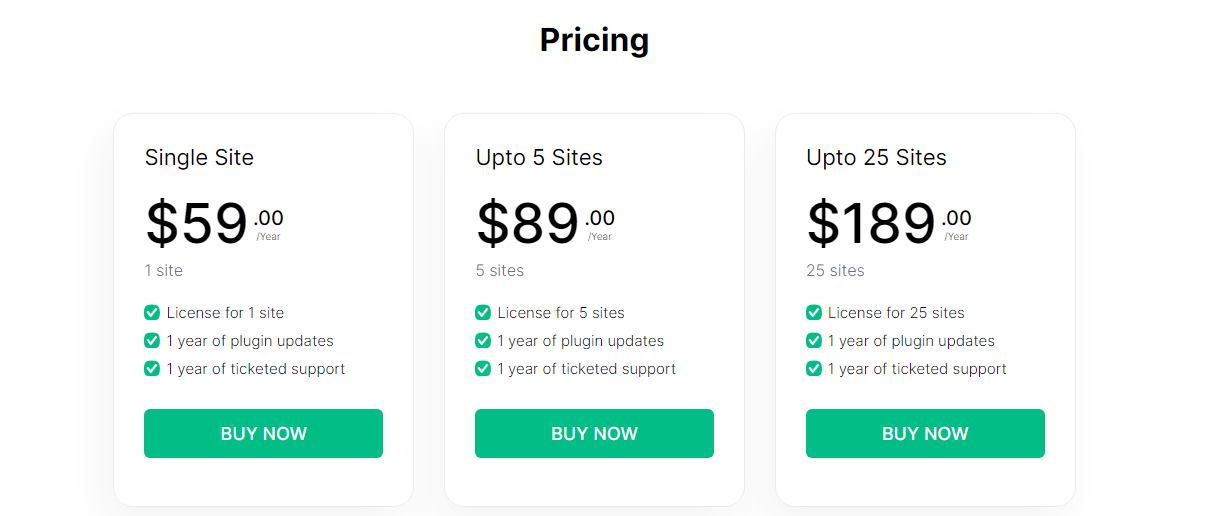
Here is the pricing plan for the PayPal Express checkout plugin.
PayPal buy Now Button

PayPal buys Now Button plugin is another remarkable PayPal WordPress plugin that you can go for. You can use this PayPal plugin as an easily placeable button anywhere on your site. Your customers will be able to pay through their PayPal money or by using a Debit or Credit card.
One of the most awarding features of the PayPal Buy Now Button plugin is that it’s not mandatory to have an eCommerce store; it works equally fine with any other WordPress Theme. Furthermore, the support is available in more than 18 languages by the support team. Also, you will have the option of more than 25 currencies to get payments. There are four types of button styles that you can use on your site.
The pro version is packed with more valuable options. You’ll get a sales report, calculated amount of after-tax application, shipping charges, and product name and price visible on the Button.
Features of PayPal Buy Now Button
- Simply put the name and price of your product in the plugin and get your Payment button ready in no time.
- Integrates very well with all types of WordPress Themes
- Support can provide help in more than 18 languages
- Customers can pay their payments in about more than 25 currencies’.
- The free version supports up to four types of Payment buttons
- There is no limit to using the PayPal button on your site, and you can put it on your pages or posts as many times as you like
Pricing
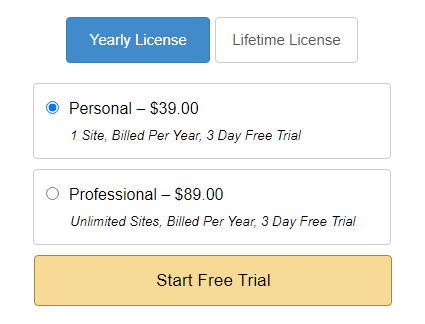
PayPal Buy Now Button can be downloaded for free from the WordPress repository, while if you like to have some advanced features, go for the pro version. Here’s the pricing of the pro version.
WP Easy PayPal Payment Accept WordPress Plugin

WP Easy PayPal Payment Accept Plugin can be used to accept PayPal payments for product purchase/ service or Donation with a single click. It comes with multiple currency support and also a support donation option. It’s easy to use, and all you need to do is place the Shortcode on your sidebar, page, or post, and it’s good to go. However, if you are looking for a PayPal plugin for an eCommerce store, this might not help you because it doesn’t support shopping cart or eCommerce functionality.
WP Easy PayPal Payment Accept Features
- Easy to set up and user-friendly interface.
- The WP plugin allows using country code to change the checkout page language during the checkout process.
- Receive payment without running into a snag.
- You can place a custom image parameter in Shortcode to display an image for the payment button.
- It allows opening payment page in a new window
- You can use this plugin in three ways; add a Shortcode to your post or page, add the function from the template file or use it as a widget from the widget menu bar.
- Change payment currency into any of your preferred currencies.
The wp Easy PayPal plugin is completely free to download

-
WooCommerce PayPal Checkout Payment Gateway
The WooCommerce PayPal checkout payment Gateway plugin’s developer is WooCommerce itself, and therefore you need not worry about the security, and your customers will experience a smooth money transfer. You can even sell subscriptions with this plugin if you utilize its in-context checkout feature. The payment transfer procedure isn’t complicated, and customers can pay directly to your business account with the PayPal checkout payment plugin.
Features of WooCommerce PayPal Checkout Payment Gateway
- The users will receive money without any security concerns.
- Users can avail of recurring or subscription payments.
- The plugin supports full and partial refunds that help in winning your customers trust
- The plugin can be set up with minimal effort, and it’ll hardly take a few minutes to complete the setup
- You can test payment options as the plugin supports sandbox mode that let you test different payment options
- The buyers can accomplish their payment using the guest checkout facility
WooCommerce PayPal checkout plugin can be downloaded for free without any upfront payment from the WordPress repository.
-
WordPress Simple PayPal Shopping Cart
If you are selling physical products or subscriptions and looking out for convenient options to place an add-to-cart option on your eCommerce site, this WordPress simple PayPal Shopping Cart will serve you best. It’s a lightweight PayPal payment plugin that is easy to customize.
With WordPress Simple PayPal shopping cart, you’ll be able to add shopping cart options on your ecommerce site. Its customizable button facility will let you create Payment buttons according to your brand’s voice. Moreover, you can add this PayPal Payment button with the help of Shortcode to any corner of your pages and posts.
The customers can also view how many products they have added to their shopping cart using the WordPress Simple PayPal Shopping Cart plugin, thanksfully, they need not click on the cart to check the items they have added.
WordPress Simple PayPal Shopping Cart key Features
- Add -to-cart Button anywhere on your posts or pages; add a shopping cart on the sidebar or posts and pages.
- A lightweight PayPal payment plugin- won’t slow down your site speed
- Other than using this plugin for eCommerce sites, you can also use it on other WordPress sites selling media files, photos, videos, or eBooks.
- It also lets you create a product box for your products on your WordPress page.
- When customers have completed their purchase, you can customize also send them a thank-you email.
- Also, you can enable the discount coupon feature with the shopping cart plugin.
Which is the best PayPal plugin for WordPress?
Although, we have hand-picked some of the best PayPal plugins that work best for WordPress according to the different needs of users. But the most impressive one is PayPal Express Checkout Payment Gateway for WooCommerce. Because WooCommerce has especially designed this PayPal payment plugin for eCommerce websites. Also, there are many useful features included in the free version. At the same time, the paid version also offers more advanced functionalities such as WooCommerce subscriptions, in-context checkout, Order cancellation URLs, and many other features.
Frequently asked questions (FAQs)
Which PayPal Plugin is best for WordPress?
We have carefully selected the PayPal plugins ideal for any WooCommerce or WordPress website; however, the PayPal Express Checkout payment plugin is still on top of them because of its feature-rich functionality.
How do I add the PayPal plugin to my WordPress site?
- Go to the Dashboard of your WordPress site
- Click on the Plugins > Add new plugins
- Search for your desired PayPal plugin in the search bar
- Click on install and activate.
Final verdict
If you like to provide a smooth and straightforward Payment solution to your customers, having a PayPal plugin for secured payments is a must-have. Also, “Buy Now” and “Add to the cart” options are obligatory for any eCommerce site. Providing a one-click payment solution to your customers helps retain them for longer. That’s why we have saved your time to dive into the market and look for the best WordPress PayPal payment plugin in town. Check out which one works best for your eCommerce site, and let us know in the comment section for the experience
